
Guide · Real Build Overview
Building a Real Mobile Game For Free With AI
This article is not a tutorial, but an overview of the free tools we used to vibe code a ready-to-ship mobile game in just 2 weeks. It doesn't go into depth on any particular tool, but aims to get you familiar with the suite of tools that are available for free when you start vibe coding your own mobile game.
Project overview
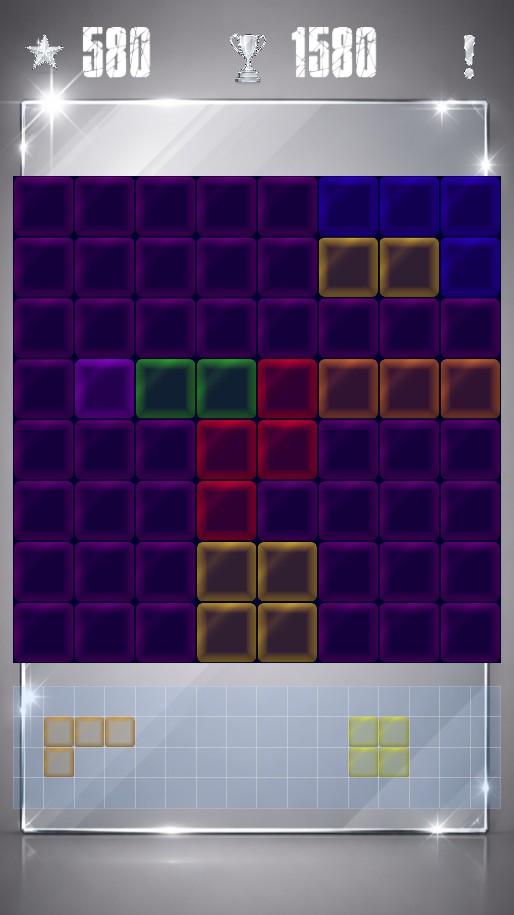
For this project we chose to create our own version of a Tetris clone, similar to that of Block Blast where the tetromino shapes are picked up and placed versus falling from the top of the screen. Our game is fully app store ready and already has Google Admob implemented which enables ad revenue earnings.
After reading this article, you will know how to get your own premium looking game graphics, game sounds, and an example of the programming tools needed to build your own mobile game. At You Can Build Tech we believe that learning to code should be free, so the tools we recommend are free to use or come with free tiers.
Choosing the game engine
Before creating a mobile game you need to choose your game engine of choice. Before this project we had already decided to use the Godot game engine for a few reasons:
- The Godot game engine is extremely light weight, meaning it barely uses any space on your laptop or PC. Which is great if you have limited harddrive space. It also starts up incredibly fast and the entire user interface (the editor) is snappy and nimble.
- Another great feature of the Godot engine is that it's totally free to use, unlike Unity which is free to use but comes with a license that requires you pay thousands of dollars later if your game becomes a success. Since we believe coding and developing apps should be free (especially for beginners or hobbyists), we dropped Unity and didn't look back.
- This third benefit is really just a bonus, but Godot uses GDScript as it's programming language and it has a syntax that is easier to read and write, especially as a newbie to coding. So having a programming language that is easier for our students is great!
Vibe coding with multiple AI tools
For the vibe coding part of the game we used a variety of chatbots including Claude, Chat-GPT, Grok, and a little bit of Copilot. We didn't experiment with Perplexity, but we're sure it would have also been useful. The reason we used so many chatbots instead of one boils down to two reasons. Firstly, there are rate limits on the free tiers of these chat bots, and Claude code even has some rate limits on the paid version. Needless to say we didn't renew our Claude subscription. The second reason for using multiple chatbots is that when one AI gets stuck, it can sometimes help to give the problem to another LLM.
Free tools and AI-generated assets
We also used AI tools for a the game visuals such as graphics, icons, and game sounds. This included getting sprites for the minos (the "Tetris" blocks), the icons for the score & high score, and the settings buttons. For the sound we used the incredible ElevenLabs text-to-voice to create the phrases for our character in the game who give audible feedback. ElevenLabs also has a very useable free tier. We plan to add music to the game in the next version and for that we will probably use Top Media which can create some really nice instrumental based on text prompts.
Voice feedback for the in-game character was generated using AI text-to-speech tools available on free tiers. Music will be added in a later iteration.
What comes next
This article serves as a high-level overview. In the next entry, we’ll look more closely at:
- Where AI helped—and where it got in the way
- How game state and variables were structured
- Common pitfalls when coding with AI assistance